UNO R4 WiFiとESP32でREST API (2) - 大きなJSONデータを解析するArduinoJson活用法
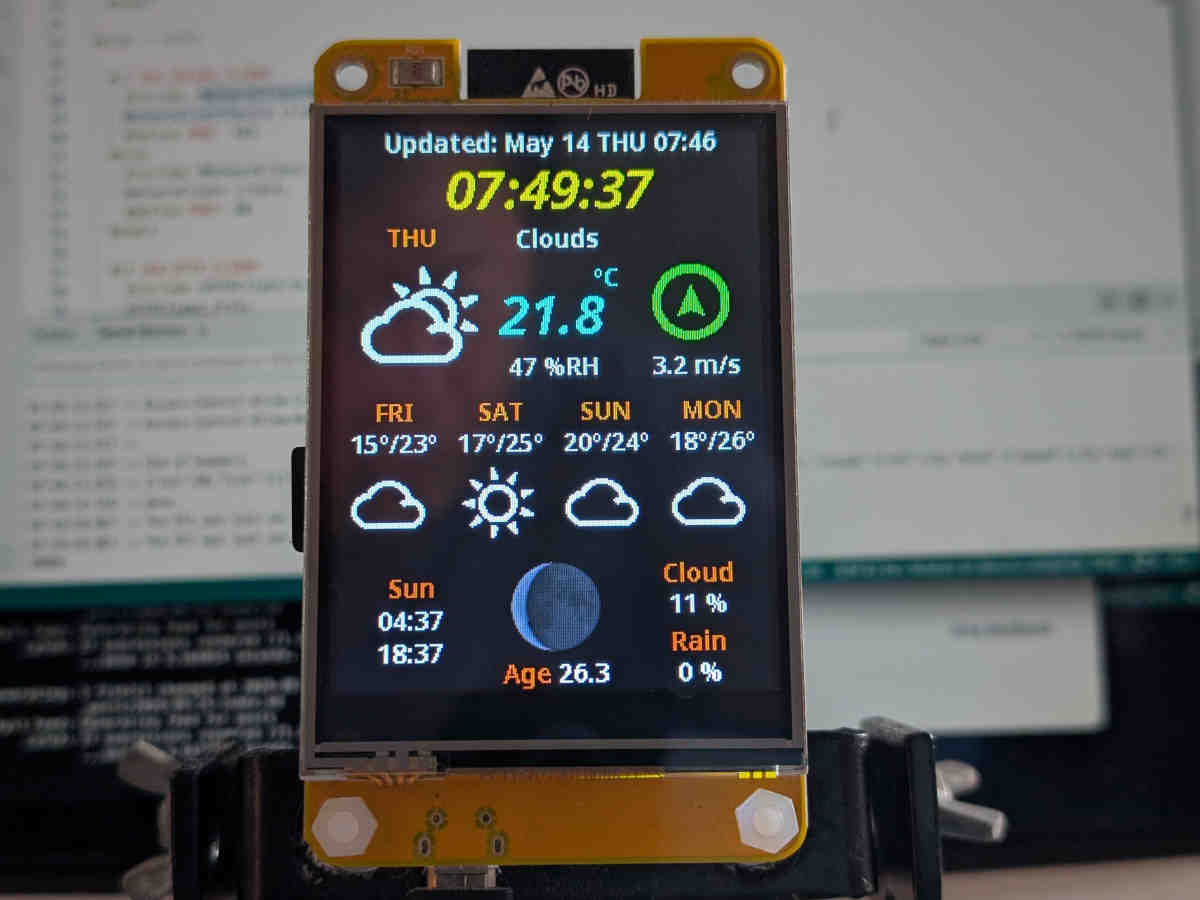
はじめに
Arduino UNO R4 WiFi でも動作する ArduinoOpenWeather の制作過程で得られた知見を共有する3部作の第2回目です。
- RTC、NTP、HTTP、TLS、ルートCA証明書の例題
- 大きなJSONデータを解析するArduinoJson活用法(今回)
- アイコン画像をUNO R4のFlash容量内に収める方法
UNO R4 WiFi といった RAM が限られた環境では、5日間の天気予報 API のような大きな JSON を解析(=Deserialize、逆シリアライズ)する際、メモリ不足の問題に直面します。
本記事では ArduinoJson 公式ページ にホストされた次の3つを元に、「設計」と「実装」の側面からポイントと具体例を示し、大きな JSON を効率的に扱う方法の解説を試みます。
- ArduinoJson Assistant
実行時に必要なメモリ量とその余裕の度合いを見積もるツールです。 - How to deserialize a very large document?
不要なデータを読み飛ばすフィルタとバッファリングが不要な Stream の使い方です。 - How to reduce memory usage?
省メモリに役立つ幾つかのテクニックが解説されています。
本記事が前提とするプラットフォームとバージョンは次の通りです。
| バージョン | RA4M1 | ESP32 |
|---|---|---|
| プラットフォーム | Arduino UNO R4 Boards by Arduino 1.5.3 | esp32 by Espressif Systems 3.3.8 |
ArduinoJson のバージョンについて
本記事では ArduinoJson 7 を対象としています。
“How to upgrade from ArduinoJson 6 to 7” に書かれたバージョン 6 からの変化点の1つに、StaticJsonDocument と DynamicJsonDocument の JsonDocument への統合があります。即ち バージョン 7 では、予めメモリプールを指定する必要がなく(あるいは指定することができず)、必要なメモリは常にヒープ領域から割り当てられます。
さらにこの統合により、JsonDocument のサイズを測定するメソッド memoryUsage() が非推奨となり、常に 0 が返されるようになりました。
これらはメモリ配置の設計とデバッグに 少なからず影響を与えます。そのため本記事では、コンパイル時に生成されるマップファイルを活用したメモリ容量の確認方法を解説します。
大きな JSON データの扱い方 〜設計上のポイント〜
設計時に考慮すべき事項は次の3つに集約されると思います。
deserializeJson()に必要なメモリサイズを見積もるdeserializeJson()への入力はバッファリングしないdeserializeJson()が使えるヒープメモリを確保する
1. deserializeJson() に必要なメモリサイズを見積もる
ArduinoJson のページにには、バージョン 7.4 用に実行時に必要なメモリ量を見積もってくれる便利なツール ArduinoJson Assistant が提供されています。
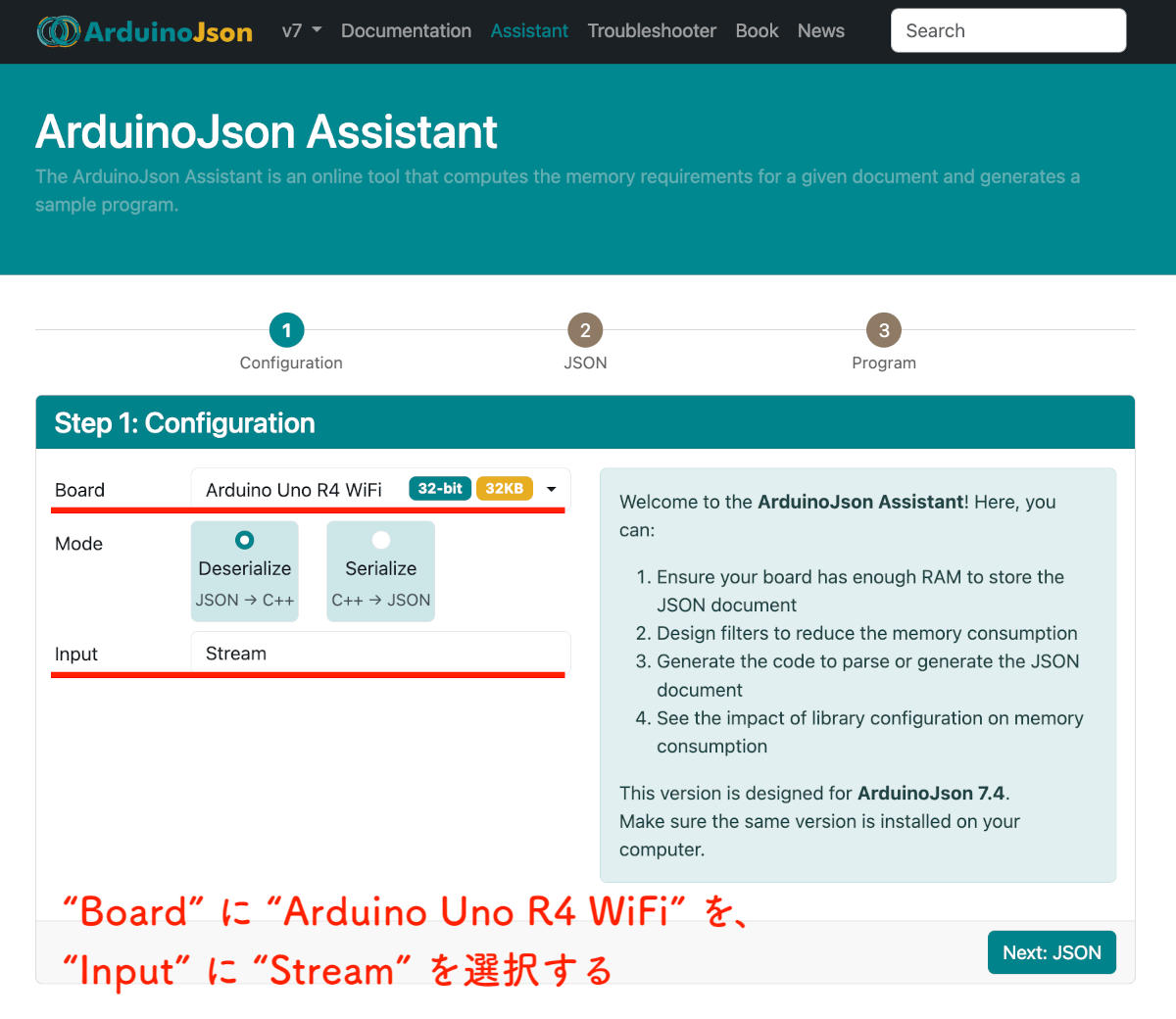
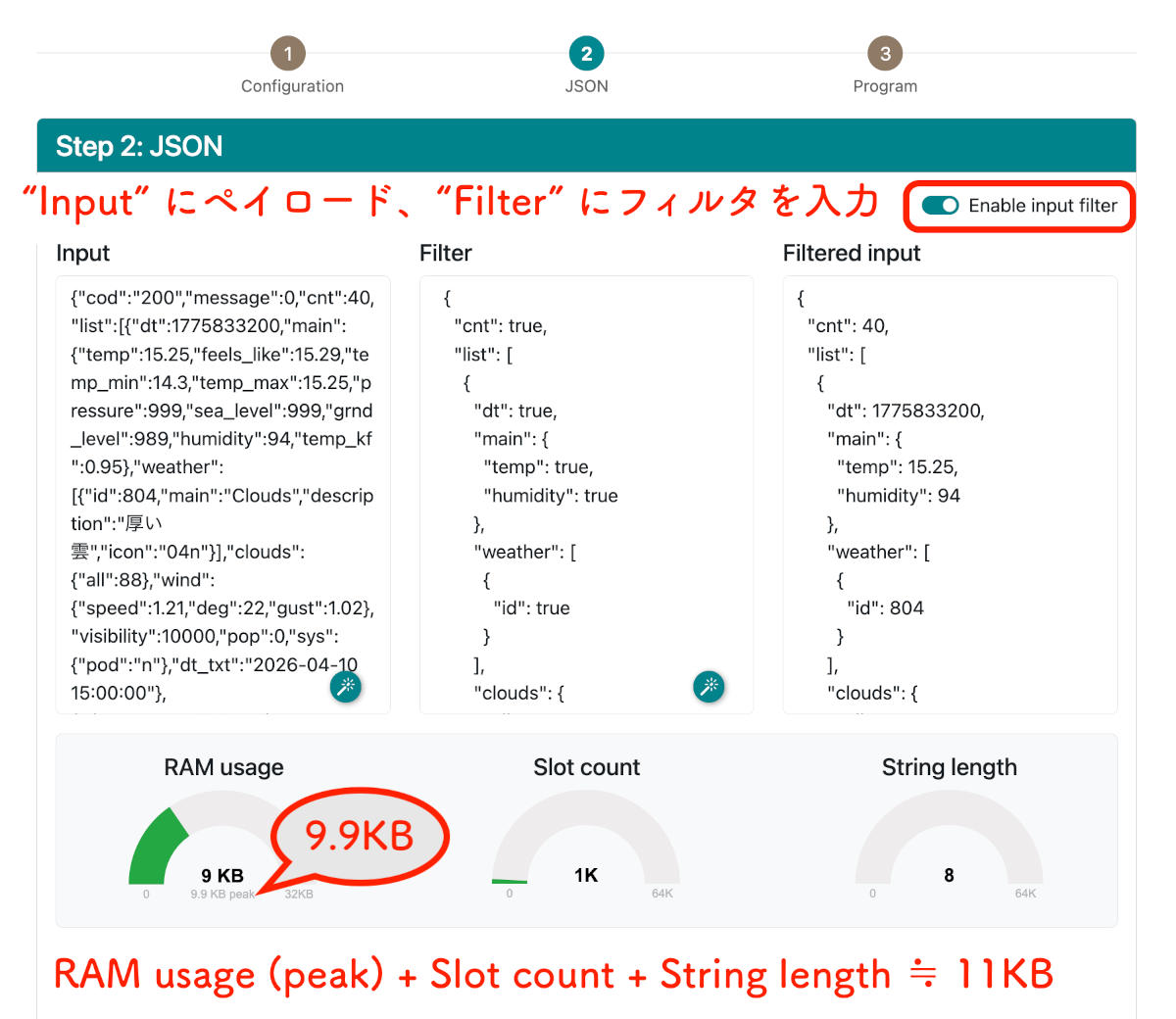
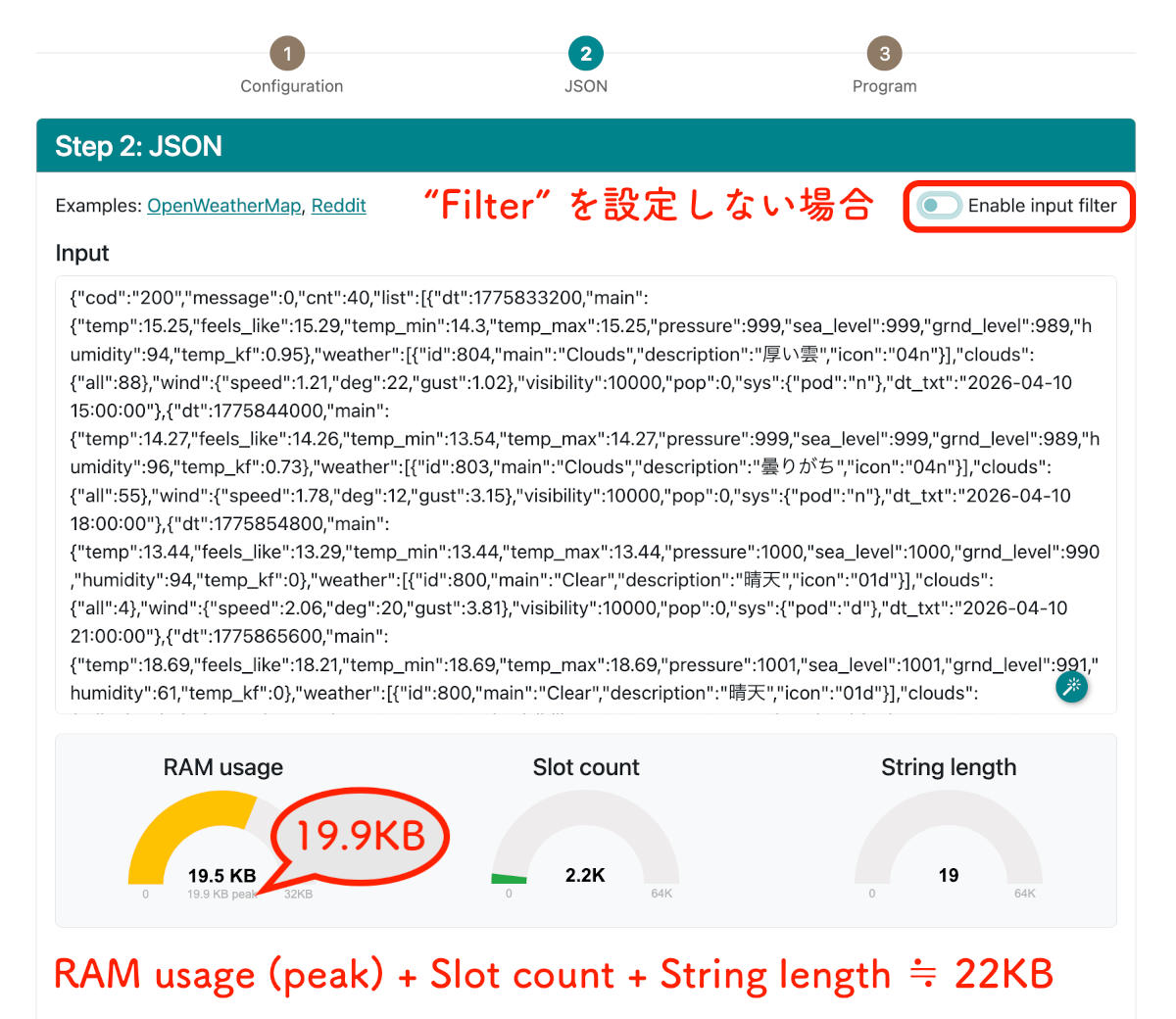
図1に示すように、ステップ1でターゲットボード、逆シリアライズ、そして入力のデータ型を選択します。図2に示すステップ2では、予めブラウザ等で取得した JSON のペイロード、および アプリに必要なキーと値だけを抽出するフィルタ を入力します。
このステップ2で示される半円形の各メーターが示す意味は以下の通りです。
- RAM usage
太字の値は、解析完了後に保持されるサイズです。一方、実際の逆シリアライズ実行に必要なメモリ量はpeak + Slot count + String lengthで概算できます。 - Slot count
「Slot」は、様々な型のデータを格納するため 内部に構築されるツリー構造 のコンテナで、そのサイズを示しています。 - String length
内部的にどのバッファへ対応しているかは明確に確認できませんでしたが、少なくとも実測上は加算して見積もる必要があります。
2. deserializeJson() への入力はバッファリングしない
Arduino の Stream クラス は、入出力のインターフェースを「連続したバイトデータの流れ」として抽象化したクラス です。例えば WiFiSSLClient は、以下の継承関係から read() や available() など、Serial と同様のメソッドが使えます。
WiFiClient →
Client →
Stream →
Print
一方、逆シリアライズには deserializeJson(JsonDocument& doc, Stream& input); というシグネチャがあり、Stream クラスを継承する WiFiSSLClient オブジェクトを入力とすることで、1バイトずつ読み進めながらの逆シリアライズが可能です。つまり JSON 一部または全体を RAM 上に保持する必要がありません。
入力を String などにバッファリング(≒コピー)しながら逆シリアライズする方法に比べ、当然オーバーヘッドはありますが、遥かに省メモリで済むというワケです。
3. deserializeJson() が使えるヒープメモリを確保する
私は小さなプロトタイピングとテストを繰り返し、設計にフィードバックしながら少しずつ大きくして行く作り方を好みます。ここではこの工程を「設計」としています。ちょっと苦しい説明ですが… 🙄
まぁ工程の分類論はともかく、アプリとして動かした時のヒープ残量の確認方法を早めに確立しておくことの必要性はご理解いただけると思います 😎
【RA4M1 の場合】
UNO R4 では、コンパイル時に生成されるマップファイルを見ることで、アップロード前にヒープ容量を概算できます。
図4は、Renesas RA4M1グループユーザーズマニュアル ハードウェア編 からメモリマップを引用し、内蔵 SRAM にフォーカスを当てた図です。
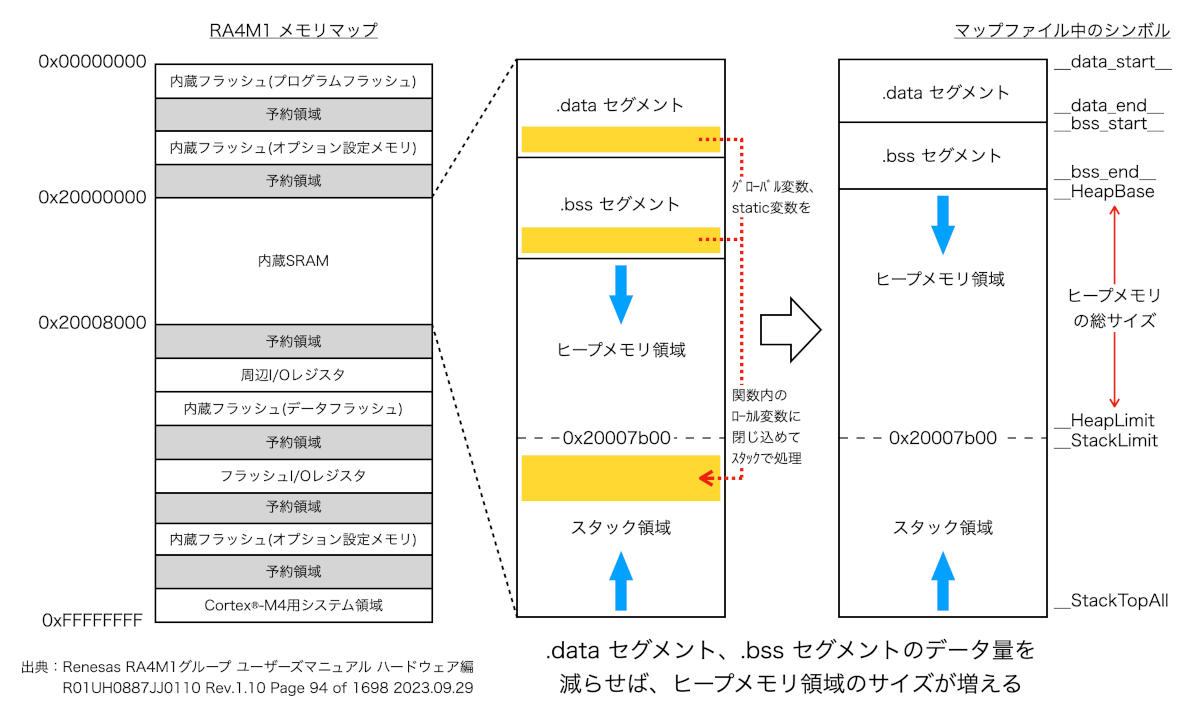
図では、data セグメントや bss セグメント に配置されるグローバル変数をスタックに移すことができれば、ヒープ領域を増やせることを示しています。
即ち、特定の関数内にローカル変数として局所化できるかが設計上のポイントになるので、次章で「実装例」を示します。
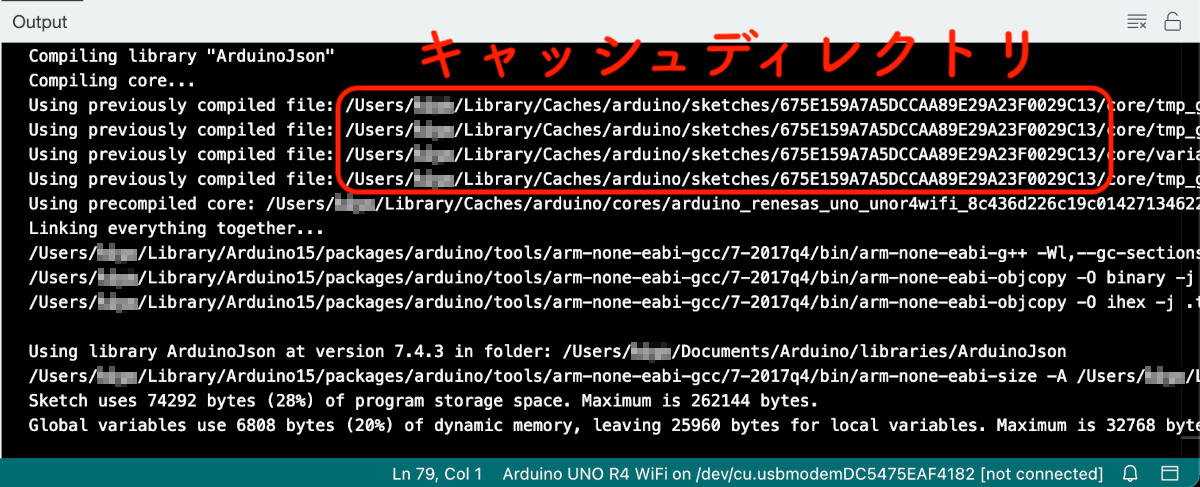
また同図右端「マップファイル中のシンボル」は、キャッシュディレクトリ中の .map ファイルをテキストエディタで開いて検索すれば拾えます。
次の表は、グローバル変数の異なるスケッチ A と B について、シンボルが示すアドレスを比べたものです。太字で示した data や bss のセグメントはそのアドレスが変動する一方、ヒープメモリとスタックとの境界は変わらないことが見て取れます。
| マップファイル中のシンボル | スケッチ A アドレス | スケッチ B アドレス |
|---|---|---|
__data_start__ |
0x20000000 | 0x20000000 |
__data_end__ |
0x20000250 | 0x20000320 |
__bss_start__ |
0x20000268 | 0x20000338 |
__bss_end__ |
0x20001ab0 | 0x200028d8 |
__HeapBase |
0x20001ab0 | 0x200028d8 |
__HeapLimit |
0x20007b00 | 0x20007b00 |
__StackLimit |
0x20007b00 | 0x20007b00 |
__StackTopAll |
0x20007f00 | 0x20007f00 |
vector_table |
0x20008000 | 0x20008000 |
この表は、アップロードせずにコンパイルするだけで得られるところがミソです。ヒープメモリの総サイズは (__HeapLimit - __HeapBase) で計算できるので、図1〜3で見積もった必要なヒープサイズ が収まるか、またマージンは十分かを事前に判定することが出来ます。
またプログラム実行中のヒープ状態を確認するには mallinfo() が使えます。
#include <stdio.h>
#include <malloc.h>

void check_heap_size(void) {
  struct mallinfo mi = mallinfo();

  printf("total space allocated from system (arena): %lu\n", mi.arena);
  printf("number of non-inuse chunks (ordblks):      %lu\n", mi.ordblks);
  printf("unused -- always zero (smblks):            %lu\n", mi.smblks);
  printf("number of mmapped regions (hblks):         %lu\n", mi.hblks);
  printf("total space in mmapped regions (hblkhd):   %lu\n", mi.hblkhd);
  printf("unused -- always zero (usmblks):           %lu\n", mi.usmblks);
  printf("unused -- always zero (fsmblks):           %lu\n", mi.fsmblks);
  printf("total allocated space (uordblks):          %lu\n", mi.uordblks);
  printf("total non-inuse space (fordblks):          %lu\n", mi.fordblks);
  printf("top-most, releasable space (keepcost):     %lu\n", mi.keepcost);
}
RA4M1 で有効なのは次の3つで、arena = uordblks + fordblks が成り立ちます。
arena… 動的に割り当てられたヒープメモリの総サイズuordblks… Used Ordinary Blocks、使用中の通常メモリブロックのバイト数fordblks… Free Ordinary BLocks、解放済み通常メモリブロックのバイト数
つまりは「ヒープ全体のサイズ (__HeapLimit - __HeapBase) と arena の差をヒープメモリの最大残量と見なす」というワケです。
2026年10月13日 追記
完成したアプリケーション で、実際のヒープメモリの残量を見積もってみました。次回記事の「おわりに − ヒープメモリ残量の見積もり」をご覧いただければと思います。
malloc.h はどこにある?
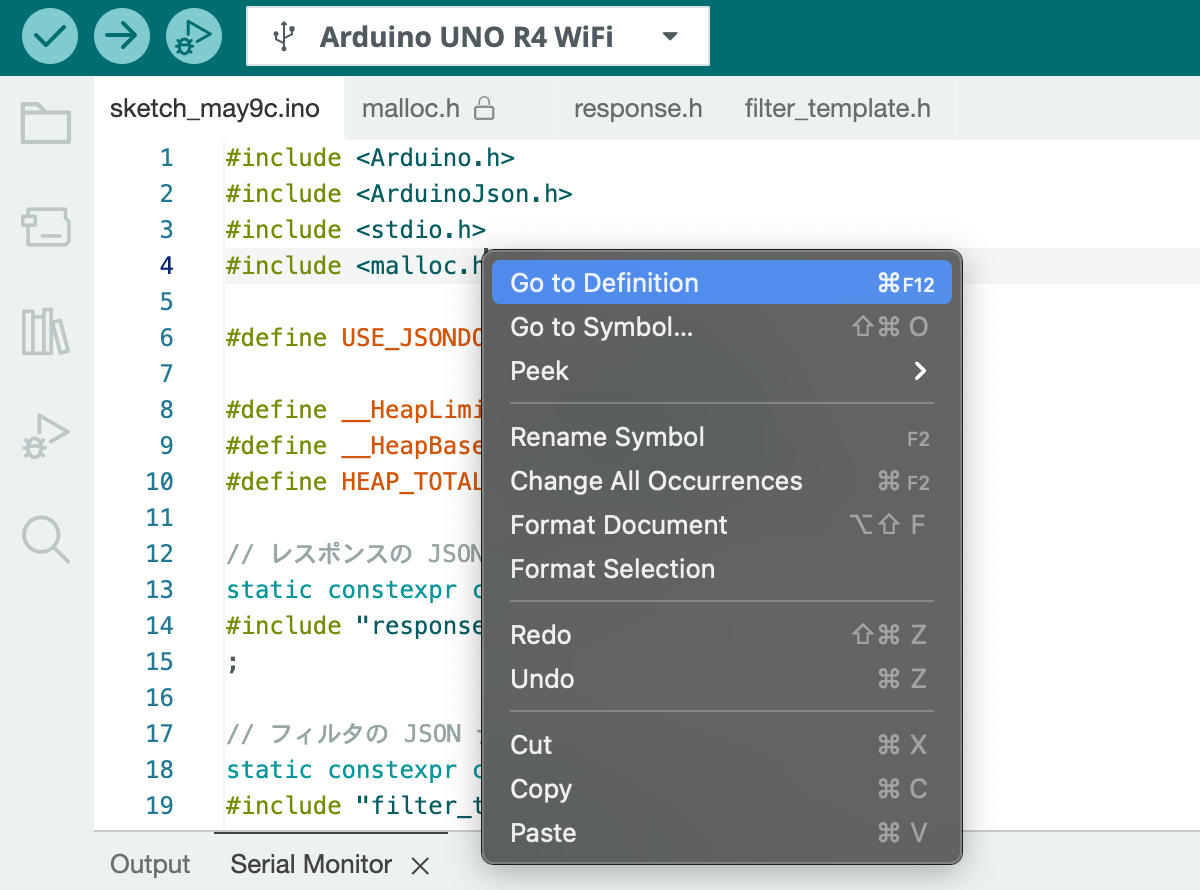
malloc.h はプラットフォームパッケージがインストールされている Arduino15 フォルダ中にあります。
#include <malloc.h> の行にカーソルを合わせ、右クリックから「Go to Definition」で開くことが出来ます。
簡易表示を行う malloc_stats() など、他にも使えそうな関数が見つかると思います。
【ESP32 の場合】
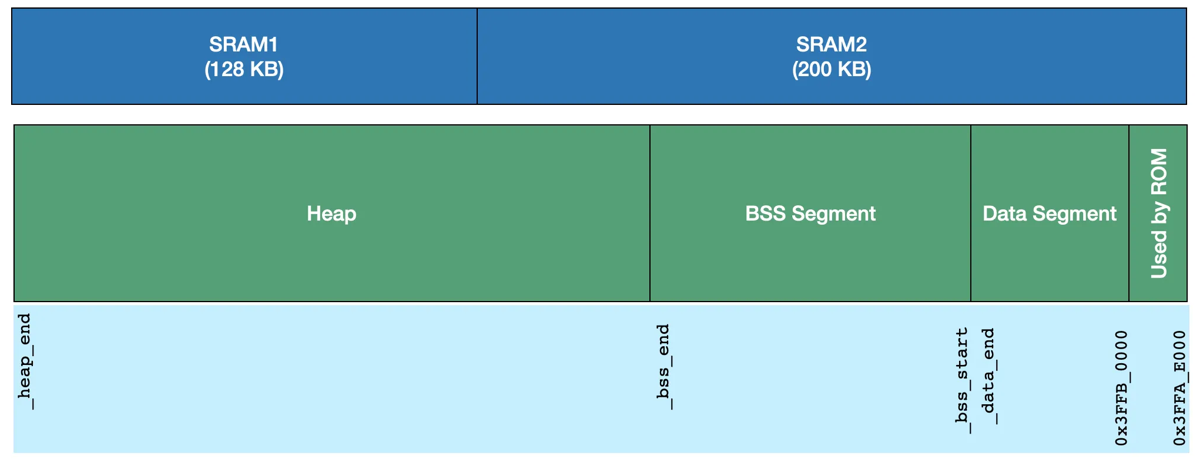
図6は、ESP32 Programmers’ Memory Model から引用した DRAM (Data RAM) のメモリマップです。図中のシンボルが示すアドレスはマップファイルに見つけることが出来ます。
ただし FreeRTOS 環境下で動作する ESP32 では、スタックは各タスクごとにヒープ領域から割り当てられるため(出典:Heap Memory Allocation)、マップファイルからヒープの使用状況を特定するのは困難ですし、mallinfo() も機能しません 😒
そこで DRAM の空きサイズを返す heap_caps_get_free_size() か、またはオススメの heap_caps_get_info() を使います。「DRAM 自体の空きサイズ=ヒープメモリの残量」とするワケです。
#include <esp_heap_caps.h>

void check_heap_size(void) {
  const uint32_t caps = MALLOC_CAP_DEFAULT;

  multi_heap_info_t info;
  heap_caps_get_info(&info, caps);

  printf("Heap total size     :%7d\n", heap_caps_get_total_size(caps));
  printf("Heap free  size     :%7d\n", info.total_free_bytes); // heap_caps_get_free_size(caps) と同値
  printf("Heap allocated size :%7d\n", info.total_allocated_bytes);
  printf("Heap minimum free   :%7d\n", info.minimum_free_bytes);
  printf("Heap largest free   :%7d\n", info.largest_free_block);
}
デフォルトで起動されるタスクの確認方法
#include "freertos_stats.h"

void setup() {
  Serial.begin(115200);
  while (millis() < 2000);

  printRunningTasks(Serial);
}

void loop() {}
Tasks: 7, Runtime: 2s, Period: 2001405us
Num Name Load Prio Free Core State
8 loopTask 0% 1 7244 1 Running
5 IDLE0 97% 0 576 0 Ready
6 IDLE1 0% 0 568 1 Ready
3 esp_timer 0% 22 8160 0 Suspended
7 Tmr Svc 0% 1 3596 * Blocked
2 ipc1 2% 24 480 1 Suspended
1 ipc0 1% 24 484 0 SuspendedPSRAM を使う方法とその応用について
万が一(RA4M1 に比べて広大な)DRAM で足りない場合に、PSRAM を使う方法が How to use external RAM on ESP32? に紹介されています。私は当初、この仕組みを使って逆シリアライズ時のメモリ使用量を観測していました。
realloc() による再割り当てを追跡していないので正確ではりませんが、目安にはなると思うので、一応、紹介しておきます。
static size_t allocSize = 0, reallocSize = 0;
struct HeapAllocator : ArduinoJson::Allocator {
  void* allocate(size_t size) override {
    allocSize += size;
    return malloc(size);
  }
  void deallocate(void* pointer) override {
    free(pointer);
  }
  void* reallocate(void* ptr, size_t new_size) override {
    reallocSize += new_size;
    return realloc(ptr, new_size);
  }
};
HeapAllocator allocator;
JsonDocument doc(&allocator);
deserializeJson(doc, input);大きな JSON データの扱い方 〜実装例〜
この章では、前章の内容を実際に試してみたい方向けに、私が試したコードを共有します。
§ 逆シリアライズ前後のヒープメモリ残量を確認する
OpenWeather をローカル環境で試すスケッチ
5日間の天気予報 API の JSON データを Flash に配置した、ヒープメモリの残量を確認するスケッチを作ってみました。新規スケッチに response.h と filter.h を追加して下さい。
スケッチでは、#if 〜 #else 〜 #endif で UNO R4 WiFi 用と ESP32 用を切り替えてます。特に UNO 用は使用可能なヒープメモリの総量をマップファイルから拾って埋め込んでいます。環境によっては値が異なるかも知れ無いので、念の為マップファイルで確認して下さい。
response.h
R"literal(
{"cod":"200","message":0,"cnt":40,"list":[{"dt":1775833200,"main":{"temp":15.25,"feels_like":15.29,"temp_min":14.3,"temp_max":15.25,"pressure":999,"sea_level":999,"grnd_level":989,"humidity":94,"temp_kf":0.95},"weather":[{"id":804,"main":"Clouds","description":"厚い雲","icon":"04n"}],"clouds":{"all":88},"wind":{"speed":1.21,"deg":22,"gust":1.02},"visibility":10000,"pop":0,"sys":{"pod":"n"},"dt_txt":"2026-04-10 15:00:00"},{"dt":1775844000,"main":{"temp":14.27,"feels_like":14.26,"temp_min":13.54,"temp_max":14.27,"pressure":999,"sea_level":999,"grnd_level":989,"humidity":96,"temp_kf":0.73},"weather":[{"id":803,"main":"Clouds","description":"曇りがち","icon":"04n"}],"clouds":{"all":55},"wind":{"speed":1.78,"deg":12,"gust":3.15},"visibility":10000,"pop":0,"sys":{"pod":"n"},"dt_txt":"2026-04-10 18:00:00"},{"dt":1775854800,"main":{"temp":13.44,"feels_like":13.29,"temp_min":13.44,"temp_max":13.44,"pressure":1000,"sea_level":1000,"grnd_level":990,"humidity":94,"temp_kf":0},"weather":[{"id":800,"main":"Clear","description":"晴天","icon":"01d"}],"clouds":{"all":4},"wind":{"speed":2.06,"deg":20,"gust":3.81},"visibility":10000,"pop":0,"sys":{"pod":"d"},"dt_txt":"2026-04-10 21:00:00"},{"dt":1775865600,"main":{"temp":18.69,"feels_like":18.21,"temp_min":18.69,"temp_max":18.69,"pressure":1001,"sea_level":1001,"grnd_level":991,"humidity":61,"temp_kf":0},"weather":[{"id":800,"main":"Clear","description":"晴天","icon":"01d"}],"clouds":{"all":1},"wind":{"speed":1.71,"deg":63,"gust":0.72},"visibility":10000,"pop":0,"sys":{"pod":"d"},"dt_txt":"2026-04-11 00:00:00"},{"dt":1775876400,"main":{"temp":25.1,"feels_like":24.45,"temp_min":25.1,"temp_max":25.1,"pressure":999,"sea_level":999,"grnd_level":990,"humidity":30,"temp_kf":0},"weather":[{"id":800,"main":"Clear","description":"晴天","icon":"01d"}],"clouds":{"all":1},"wind":{"speed":1.84,"deg":208,"gust":6.58},"visibility":10000,"pop":0,"sys":{"pod":"d"},"dt_txt":"2026-04-11 03:00:00"},{"dt":1775887200,"main":{"temp":26.71,"feels_like":25.82,"temp_min":26.71,"temp_max":26.71,"pressure":998,"sea_level":998,"grnd_level":989,"humidity":17,"temp_kf":0},"weather":[{"id":800,"main":"Clear","description":"晴天","icon":"01d"}],"clouds":{"all":1},"wind":{"speed":5.48,"deg":287,"gust":10.87},"visibility":10000,"pop":0,"sys":{"pod":"d"},"dt_txt":"2026-04-11 06:00:00"},{"dt":1775898000,"main":{"temp":18.74,"feels_like":18,"temp_min":18.74,"temp_max":18.74,"pressure":1003,"sea_level":1003,"grnd_level":993,"humidity":51,"temp_kf":0},"weather":[{"id":800,"main":"Clear","description":"晴天","icon":"01d"}],"clouds":{"all":0},"wind":{"speed":2.98,"deg":74,"gust":6.19},"visibility":10000,"pop":0,"sys":{"pod":"d"},"dt_txt":"2026-04-11 09:00:00"},{"dt":1775908800,"main":{"temp":15.6,"feels_like":14.76,"temp_min":15.6,"temp_max":15.6,"pressure":1006,"sea_level":1006,"grnd_level":996,"humidity":59,"temp_kf":0},"weather":[{"id":800,"main":"Clear","description":"晴天","icon":"01n"}],"clouds":{"all":0},"wind":{"speed":3.66,"deg":61,"gust":4.96},"visibility":10000,"pop":0,"sys":{"pod":"n"},"dt_txt":"2026-04-11 12:00:00"},{"dt":1775919600,"main":{"temp":13.03,"feels_like":11.64,"temp_min":13.03,"temp_max":13.03,"pressure":1007,"sea_level":1007,"grnd_level":996,"humidity":48,"temp_kf":0},"weather":[{"id":800,"main":"Clear","description":"晴天","icon":"01n"}],"clouds":{"all":1},"wind":{"speed":3.52,"deg":35,"gust":4.86},"visibility":10000,"pop":0,"sys":{"pod":"n"},"dt_txt":"2026-04-11 15:00:00"},{"dt":1775930400,"main":{"temp":11.15,"feels_like":9.23,"temp_min":11.15,"temp_max":11.15,"pressure":1010,"sea_level":1010,"grnd_level":1000,"humidity":35,"temp_kf":0},"weather":[{"id":800,"main":"Clear","description":"晴天","icon":"01n"}],"clouds":{"all":1},"wind":{"speed":3.74,"deg":360,"gust":7.34},"visibility":10000,"pop":0,"sys":{"pod":"n"},"dt_txt":"2026-04-11 18:00:00"},{"dt":1775941200,"main":{"temp":10.57,"feels_like":8.389999,"temp_min":10.57,"temp_max":10.57,"pressure":1012,"sea_level":1012,"grnd_level":1002,"humidity":27,"temp_kf":0},"weather":[{"id":802,"main":"Clouds","description":"雲","icon":"03d"}],"clouds":{"all":26},"wind":{"speed":2.76,"deg":6,"gust":5.21},"visibility":10000,"pop":0,"sys":{"pod":"d"},"dt_txt":"2026-04-11 21:00:00"},{"dt":1775952000,"main":{"temp":14.98,"feels_like":13,"temp_min":14.98,"temp_max":14.98,"pressure":1013,"sea_level":1013,"grnd_level":1003,"humidity":18,"temp_kf":0},"weather":[{"id":801,"main":"Clouds","description":"薄い雲","icon":"02d"}],"clouds":{"all":14},"wind":{"speed":0.37,"deg":188,"gust":1.07},"visibility":10000,"pop":0,"sys":{"pod":"d"},"dt_txt":"2026-04-12 00:00:00"},{"dt":1775962800,"main":{"temp":20.56,"feels_like":18.98,"temp_min":20.56,"temp_max":20.56,"pressure":1012,"sea_level":1012,"grnd_level":1002,"humidity":12,"temp_kf":0},"weather":[{"id":800,"main":"Clear","description":"晴天","icon":"01d"}],"clouds":{"all":5},"wind":{"speed":1.96,"deg":227,"gust":3.03},"visibility":10000,"pop":0,"sys":{"pod":"d"},"dt_txt":"2026-04-12 03:00:00"},{"dt":1775973600,"main":{"temp":22.34,"feels_like":20.97,"temp_min":22.34,"temp_max":22.34,"pressure":1011,"sea_level":1011,"grnd_level":1001,"humidity":13,"temp_kf":0},"weather":[{"id":800,"main":"Clear","description":"晴天","icon":"01d"}],"clouds":{"all":3},"wind":{"speed":1.4,"deg":36,"gust":1.66},"visibility":10000,"pop":0,"sys":{"pod":"d"},"dt_txt":"2026-04-12 06:00:00"},{"dt":1775984400,"main":{"temp":17.95,"feels_like":16.38,"temp_min":17.95,"temp_max":17.95,"pressure":1014,"sea_level":1014,"grnd_level":1004,"humidity":22,"temp_kf":0},"weather":[{"id":800,"main":"Clear","description":"晴天","icon":"01d"}],"clouds":{"all":6},"wind":{"speed":4.47,"deg":49,"gust":6.98},"visibility":10000,"pop":0,"sys":{"pod":"d"},"dt_txt":"2026-04-12 09:00:00"},{"dt":1775995200,"main":{"temp":15.32,"feels_like":14.08,"temp_min":15.32,"temp_max":15.32,"pressure":1016,"sea_level":1016,"grnd_level":1006,"humidity":45,"temp_kf":0},"weather":[{"id":801,"main":"Clouds","description":"薄い雲","icon":"02n"}],"clouds":{"all":22},"wind":{"speed":1.06,"deg":31,"gust":4.11},"visibility":10000,"pop":0,"sys":{"pod":"n"},"dt_txt":"2026-04-12 12:00:00"},{"dt":1776006000,"main":{"temp":13.58,"feels_like":12.3,"temp_min":13.58,"temp_max":13.58,"pressure":1016,"sea_level":1016,"grnd_level":1006,"humidity":50,"temp_kf":0},"weather":[{"id":804,"main":"Clouds","description":"厚い雲","icon":"04n"}],"clouds":{"all":100},"wind":{"speed":1.56,"deg":19,"gust":1.84},"visibility":10000,"pop":0,"sys":{"pod":"n"},"dt_txt":"2026-04-12 15:00:00"},{"dt":1776016800,"main":{"temp":12.51,"feels_like":11.1,"temp_min":12.51,"temp_max":12.51,"pressure":1017,"sea_level":1017,"grnd_level":1006,"humidity":49,"temp_kf":0},"weather":[{"id":804,"main":"Clouds","description":"厚い雲","icon":"04n"}],"clouds":{"all":100},"wind":{"speed":1.73,"deg":13,"gust":2.19},"visibility":10000,"pop":0,"sys":{"pod":"n"},"dt_txt":"2026-04-12 18:00:00"},{"dt":1776027600,"main":{"temp":11.82,"feels_like":10.44,"temp_min":11.82,"temp_max":11.82,"pressure":1018,"sea_level":1018,"grnd_level":1007,"humidity":53,"temp_kf":0},"weather":[{"id":804,"main":"Clouds","description":"厚い雲","icon":"04d"}],"clouds":{"all":100},"wind":{"speed":1.63,"deg":12,"gust":2.03},"visibility":10000,"pop":0,"sys":{"pod":"d"},"dt_txt":"2026-04-12 21:00:00"},{"dt":1776038400,"main":{"temp":17.25,"feels_like":16.28,"temp_min":17.25,"temp_max":17.25,"pressure":1017,"sea_level":1017,"grnd_level":1007,"humidity":48,"temp_kf":0},"weather":[{"id":803,"main":"Clouds","description":"曇りがち","icon":"04d"}],"clouds":{"all":67},"wind":{"speed":1.65,"deg":207,"gust":2.66},"visibility":10000,"pop":0,"sys":{"pod":"d"},"dt_txt":"2026-04-13 00:00:00"},{"dt":1776049200,"main":{"temp":22.21,"feels_like":21.09,"temp_min":22.21,"temp_max":22.21,"pressure":1016,"sea_level":1016,"grnd_level":1005,"humidity":23,"temp_kf":0},"weather":[{"id":800,"main":"Clear","description":"晴天","icon":"01d"}],"clouds":{"all":2},"wind":{"speed":2.74,"deg":200,"gust":2.93},"visibility":10000,"pop":0,"sys":{"pod":"d"},"dt_txt":"2026-04-13 03:00:00"},{"dt":1776060000,"main":{"temp":24.41,"feels_like":23.59,"temp_min":24.41,"temp_max":24.41,"pressure":1013,"sea_level":1013,"grnd_level":1003,"humidity":26,"temp_kf":0},"weather":[{"id":800,"main":"Clear","description":"晴天","icon":"01d"}],"clouds":{"all":2},"wind":{"speed":2.18,"deg":202,"gust":2.46},"visibility":10000,"pop":0,"sys":{"pod":"d"},"dt_txt":"2026-04-13 06:00:00"},{"dt":1776070800,"main":{"temp":21.77,"feels_like":20.92,"temp_min":21.77,"temp_max":21.77,"pressure":1014,"sea_level":1014,"grnd_level":1004,"humidity":35,"temp_kf":0},"weather":[{"id":802,"main":"Clouds","description":"雲","icon":"03d"}],"clouds":{"all":34},"wind":{"speed":3.5,"deg":168,"gust":6.03},"visibility":10000,"pop":0,"sys":{"pod":"d"},"dt_txt":"2026-04-13 09:00:00"},{"dt":1776081600,"main":{"temp":19.07,"feels_like":18.39,"temp_min":19.07,"temp_max":19.07,"pressure":1016,"sea_level":1016,"grnd_level":1006,"humidity":52,"temp_kf":0},"weather":[{"id":803,"main":"Clouds","description":"曇りがち","icon":"04n"}],"clouds":{"all":67},"wind":{"speed":2.71,"deg":194,"gust":6.36},"visibility":10000,"pop":0,"sys":{"pod":"n"},"dt_txt":"2026-04-13 12:00:00"},{"dt":1776092400,"main":{"temp":17.62,"feels_like":17.08,"temp_min":17.62,"temp_max":17.62,"pressure":1016,"sea_level":1016,"grnd_level":1006,"humidity":63,"temp_kf":0},"weather":[{"id":804,"main":"Clouds","description":"厚い雲","icon":"04n"}],"clouds":{"all":100},"wind":{"speed":1.33,"deg":203,"gust":3.18},"visibility":10000,"pop":0,"sys":{"pod":"n"},"dt_txt":"2026-04-13 15:00:00"},{"dt":1776103200,"main":{"temp":16.22,"feels_like":15.7,"temp_min":16.22,"temp_max":16.22,"pressure":1016,"sea_level":1016,"grnd_level":1006,"humidity":69,"temp_kf":0},"weather":[{"id":804,"main":"Clouds","description":"厚い雲","icon":"04n"}],"clouds":{"all":100},"wind":{"speed":0.85,"deg":78,"gust":1.21},"visibility":10000,"pop":0,"sys":{"pod":"n"},"dt_txt":"2026-04-13 18:00:00"},{"dt":1776114000,"main":{"temp":14.89,"feels_like":14.16,"temp_min":14.89,"temp_max":14.89,"pressure":1017,"sea_level":1017,"grnd_level":1007,"humidity":66,"temp_kf":0},"weather":[{"id":804,"main":"Clouds","description":"厚い雲","icon":"04d"}],"clouds":{"all":98},"wind":{"speed":1.7,"deg":57,"gust":2.92},"visibility":10000,"pop":0,"sys":{"pod":"d"},"dt_txt":"2026-04-13 21:00:00"},{"dt":1776124800,"main":{"temp":18.44,"feels_like":17.67,"temp_min":18.44,"temp_max":18.44,"pressure":1017,"sea_level":1017,"grnd_level":1007,"humidity":51,"temp_kf":0},"weather":[{"id":804,"main":"Clouds","description":"厚い雲","icon":"04d"}],"clouds":{"all":92},"wind":{"speed":1.75,"deg":99,"gust":1.94},"visibility":10000,"pop":0,"sys":{"pod":"d"},"dt_txt":"2026-04-14 00:00:00"},{"dt":1776135600,"main":{"temp":21.74,"feels_like":20.99,"temp_min":21.74,"temp_max":21.74,"pressure":1015,"sea_level":1015,"grnd_level":1005,"humidity":39,"temp_kf":0},"weather":[{"id":804,"main":"Clouds","description":"厚い雲","icon":"04d"}],"clouds":{"all":96},"wind":{"speed":2.74,"deg":128,"gust":2.62},"visibility":10000,"pop":0,"sys":{"pod":"d"},"dt_txt":"2026-04-14 03:00:00"},{"dt":1776146400,"main":{"temp":21.82,"feels_like":21.08,"temp_min":21.82,"temp_max":21.82,"pressure":1014,"sea_level":1014,"grnd_level":1004,"humidity":39,"temp_kf":0},"weather":[{"id":803,"main":"Clouds","description":"曇りがち","icon":"04d"}],"clouds":{"all":76},"wind":{"speed":4.62,"deg":115,"gust":2.88},"visibility":10000,"pop":0,"sys":{"pod":"d"},"dt_txt":"2026-04-14 06:00:00"},{"dt":1776157200,"main":{"temp":17.91,"feels_like":17.27,"temp_min":17.91,"temp_max":17.91,"pressure":1015,"sea_level":1015,"grnd_level":1005,"humidity":58,"temp_kf":0},"weather":[{"id":802,"main":"Clouds","description":"雲","icon":"03d"}],"clouds":{"all":40},"wind":{"speed":4.38,"deg":109,"gust":4.72},"visibility":10000,"pop":0,"sys":{"pod":"d"},"dt_txt":"2026-04-14 09:00:00"},{"dt":1776168000,"main":{"temp":15.28,"feels_like":14.85,"temp_min":15.28,"temp_max":15.28,"pressure":1016,"sea_level":1016,"grnd_level":1006,"humidity":76,"temp_kf":0},"weather":[{"id":802,"main":"Clouds","description":"雲","icon":"03n"}],"clouds":{"all":50},"wind":{"speed":2.06,"deg":90,"gust":3.15},"visibility":10000,"pop":0,"sys":{"pod":"n"},"dt_txt":"2026-04-14 12:00:00"},{"dt":1776178800,"main":{"temp":14.23,"feels_like":13.85,"temp_min":14.23,"temp_max":14.23,"pressure":1016,"sea_level":1016,"grnd_level":1006,"humidity":82,"temp_kf":0},"weather":[{"id":803,"main":"Clouds","description":"曇りがち","icon":"04n"}],"clouds":{"all":79},"wind":{"speed":1.71,"deg":63,"gust":2.21},"visibility":10000,"pop":0,"sys":{"pod":"n"},"dt_txt":"2026-04-14 15:00:00"},{"dt":1776189600,"main":{"temp":13.41,"feels_like":13.05,"temp_min":13.41,"temp_max":13.41,"pressure":1015,"sea_level":1015,"grnd_level":1005,"humidity":86,"temp_kf":0},"weather":[{"id":803,"main":"Clouds","description":"曇りがち","icon":"04n"}],"clouds":{"all":81},"wind":{"speed":2.06,"deg":46,"gust":2.99},"visibility":10000,"pop":0,"sys":{"pod":"n"},"dt_txt":"2026-04-14 18:00:00"},{"dt":1776200400,"main":{"temp":13.27,"feels_like":12.85,"temp_min":13.27,"temp_max":13.27,"pressure":1016,"sea_level":1016,"grnd_level":1006,"humidity":84,"temp_kf":0},"weather":[{"id":804,"main":"Clouds","description":"厚い雲","icon":"04d"}],"clouds":{"all":96},"wind":{"speed":2.02,"deg":55,"gust":3.36},"visibility":10000,"pop":0,"sys":{"pod":"d"},"dt_txt":"2026-04-14 21:00:00"},{"dt":1776211200,"main":{"temp":14.74,"feels_like":14.25,"temp_min":14.74,"temp_max":14.74,"pressure":1017,"sea_level":1017,"grnd_level":1007,"humidity":76,"temp_kf":0},"weather":[{"id":804,"main":"Clouds","description":"厚い雲","icon":"04d"}],"clouds":{"all":98},"wind":{"speed":1.63,"deg":63,"gust":2.4},"visibility":10000,"pop":0,"sys":{"pod":"d"},"dt_txt":"2026-04-15 00:00:00"},{"dt":1776222000,"main":{"temp":18.25,"feels_like":17.7,"temp_min":18.25,"temp_max":18.25,"pressure":1015,"sea_level":1015,"grnd_level":1005,"humidity":60,"temp_kf":0},"weather":[{"id":804,"main":"Clouds","description":"厚い雲","icon":"04d"}],"clouds":{"all":98},"wind":{"speed":1.33,"deg":70,"gust":1.7},"visibility":10000,"pop":0,"sys":{"pod":"d"},"dt_txt":"2026-04-15 03:00:00"},{"dt":1776232800,"main":{"temp":17.27,"feels_like":16.62,"temp_min":17.27,"temp_max":17.27,"pressure":1015,"sea_level":1015,"grnd_level":1004,"humidity":60,"temp_kf":0},"weather":[{"id":804,"main":"Clouds","description":"厚い雲","icon":"04d"}],"clouds":{"all":99},"wind":{"speed":3.6,"deg":102,"gust":3.34},"visibility":10000,"pop":0,"sys":{"pod":"d"},"dt_txt":"2026-04-15 06:00:00"},{"dt":1776243600,"main":{"temp":15.25,"feels_like":14.48,"temp_min":15.25,"temp_max":15.25,"pressure":1016,"sea_level":1016,"grnd_level":1006,"humidity":63,"temp_kf":0},"weather":[{"id":804,"main":"Clouds","description":"厚い雲","icon":"04d"}],"clouds":{"all":100},"wind":{"speed":3.42,"deg":109,"gust":4.19},"visibility":10000,"pop":0.06,"sys":{"pod":"d"},"dt_txt":"2026-04-15 09:00:00"},{"dt":1776254400,"main":{"temp":12.74,"feels_like":11.9,"temp_min":12.74,"temp_max":12.74,"pressure":1019,"sea_level":1019,"grnd_level":1008,"humidity":70,"temp_kf":0},"weather":[{"id":804,"main":"Clouds","description":"厚い雲","icon":"04n"}],"clouds":{"all":100},"wind":{"speed":2.89,"deg":105,"gust":4.18},"visibility":10000,"pop":0.02,"sys":{"pod":"n"},"dt_txt":"2026-04-15 12:00:00"}],"city":{"id":1863219,"name":"Hanawadamachi","coord":{"lat":36.55,"lon":139.93},"country":"JP","population":0,"timezone":32400,"sunrise":1775765645,"sunset":1775812137}}
)literal";
filter.h
R"literal(
{
  "cnt": true,
  "list": [
    {
      "dt": true,
      "main": {
        "temp": true,
        "humidity": true
      },
      "weather": [
        {
          "id": true
        }
      ],
      "clouds": {
        "all": true
      },
      "wind": {
        "speed": true,
        "deg": true
      },
      "pop": true
    }
  ],
  "city": {
    "timezone": true,
    "sunrise": true,
    "sunset": true
  }
}
)literal"
サンプルスケッチ.ino
#include <Arduino.h>
#include <ArduinoJson.h>
#include <stdio.h>

// フィルタのあり/なし
#define USE_JSON_FILTER  false

#if defined(ARDUINO_UNOR4_WIFI)
  #include <malloc.h>

  // マップファイルから取得したヒープ領域のアドレス
  #define __HeapLimit 0x0000000020007b00
  #define __HeapBase  0x0000000020001ab0
  #define HEAP_TOTAL  (__HeapLimit - __HeapBase)

#elif defined(ESP32)
  #include <esp_heap_caps.h>

  // チェックするヒープメモリのタイプ
  #define HEAP_TYPE   MALLOC_CAP_DEFAULT // or MALLOC_CAP_8BIT
#endif

// レスポンスの JSON データ
static constexpr char response[] =
  #include "response.h"
;

// フィルタの JSON テンプレート
static constexpr char filter_literal[] =
  #include "filter.h"
;

// プロトタイプ宣言
void check_heap_size(void);

void setup() {
  Serial.begin(115200);
  while (!Serial || millis() < 2000);

  printf("Input size: %d\n", sizeof(response));

  // 逆シリアライズ前のヒープメモリ量を観測
  Serial.println("====== Before Deserialization =====");
  check_heap_size();

#if USE_JSON_FILTER
  // 逆シリアライズ(フィルタあり)
  JsonDocument doc, filter;
  deserializeJson(filter, filter_literal);
  auto error = deserializeJson(doc, response, DeserializationOption::Filter(filter));
#else
  // 逆シリアライズ(フィルタなし)
  JsonDocument doc;
  auto error = deserializeJson(doc, response);
#endif

  // 逆シリアライズ後のヒープメモリ量を観測
  Serial.println("====== After Deserialization =====");
  check_heap_size();

  if (error) {
    Serial.print("deserializeJson() failed: ");
    Serial.println(error.c_str());
    return;
  }

  serializeJson(doc, Serial); Serial.println();
//serializeJsonPretty(doc, Serial); Serial.println();
}

void check_heap_size(void) {
#if defined(ARDUINO_UNOR4_WIFI)

  struct mallinfo mi = mallinfo();

  // ヒープメモリの最大残量
  printf("Maximum free heap size: %7lu\n", HEAP_TOTAL - mi.arena);

  // arena: ヒープメモリに割り当てた総メモリー量 (= uordblks + fordblks)
  // uordblks: Used Ordinary Blocks 使用中の通常メモリブロックのバイト数
  // fordblks: Free Ordinary BLocks 解放済み通常メモリブロックのバイト数
  printf("total space allocated from system (arena): %7lu\n", mi.arena);
  printf("total allocated space (uordblks):          %7lu\n", mi.uordblks);
  printf("total non-inuse space (fordblks):          %7lu\n", mi.fordblks);

#else // ESP32

  multi_heap_info_t info;
  heap_caps_get_info(&info, HEAP_TYPE);

  printf("Heap total size     :%7ul\n", heap_caps_get_total_size(HEAP_TYPE));
  printf("Heap free  size     :%7ul\n", info.total_free_bytes); // heap_caps_get_free_size() と同値
  printf("Heap allocated size :%7ul\n", info.total_allocated_bytes);
  printf("Heap minimum free   :%7ul\n", info.minimum_free_bytes);
  printf("Heap largest free   :%7ul\n", info.largest_free_block);

#endif
}

void loop() {}
UNO R4 用を「フィルタなし」で実行すると、「ヒープメモリの最大残量」が 592 バイトになります。試しに次のグローバル変数を追加すると残量は 0 になりますが、正常に終了します。
static char tmp[592];

void setup() {
  ...
  Serial.println(tmp); // 最適化により tmp が削除されるのを防ぐ
  ...
}
さらに tmp のサイズを1バイト増やすと、ヒープ不足でエラーとなるハズです。
deserializeJson() failed: NoMemory§ グローバル変数を関数内のローカル変数に局所化する
Arduino の標準的な例題を参考にしていると、グローバル変数が増えがちです 😬
前回 紹介した UNO R4 WiFi 用のコードには、比較的サイズの大きなグローバル変数が3つ宣言されています。
// NTPサーバーとUDPで通信を行うためのインスタンス
WiFiUDP Udp;
NTPClient timeClient(Udp, ntpServers[0], TIMEZONE_OFFSET, NTP_SYNC_INTERVAL);

// REST APIサーバーとの通信用HTTPクライアント
WiFiSSLClient client;
これらのうち JSON データの解析時に必要な変数は最後の「REST APIサーバーとの通信用HTTPクライアント」だけです。一方「NTPサーバーとUDPで通信を行うためのインスタンス」は、少し工夫すると関数 rtcSyncNTP() 内のローカル変数に局所化することができ、data と bss のセグメントサイズを約 1.5KB 削減可能です 👍
How’s my SSL を試すスケッチ
ちょっと長いですが、以下の動作をする UNO R4 WiFi 用サンプルスケッチを添付します。
- 1分ごとに NTP サーバーをローテーションさせながら RTC を更新する
- 1秒ごとに RTC の時刻をシリアルモニターに出力する(RTC の精度確認用)
- 2分ごとに howsmyssl.com の REST_API を叩き、結果をシリアルモニターに出力する
何かのお役に立てれば嬉しいです。
arduino_secrets.h
#define SECRET_SSID ""
#define SECRET_PASS ""
howsmyssl_root_ca.h
// ISRG Root X1 (Downloaded by Safari, Firefox)
// openssl x509 -inform der -in ISRG\ Root\ X1.cer -out ISRG\ Root\ X1.pem
// NotBefore: Jun  4 11:04:38 2015 GMT; NotAfter: Jun  4 11:04:38 2035 GMT
R"literal(
-----BEGIN CERTIFICATE-----
MIIFazCCA1OgAwIBAgIRAIIQz7DSQONZRGPgu2OCiwAwDQYJKoZIhvcNAQELBQAw
TzELMAkGA1UEBhMCVVMxKTAnBgNVBAoTIEludGVybmV0IFNlY3VyaXR5IFJlc2Vh
cmNoIEdyb3VwMRUwEwYDVQQDEwxJU1JHIFJvb3QgWDEwHhcNMTUwNjA0MTEwNDM4
WhcNMzUwNjA0MTEwNDM4WjBPMQswCQYDVQQGEwJVUzEpMCcGA1UEChMgSW50ZXJu
ZXQgU2VjdXJpdHkgUmVzZWFyY2ggR3JvdXAxFTATBgNVBAMTDElTUkcgUm9vdCBY
MTCCAiIwDQYJKoZIhvcNAQEBBQADggIPADCCAgoCggIBAK3oJHP0FDfzm54rVygc
h77ct984kIxuPOZXoHj3dcKi/vVqbvYATyjb3miGbESTtrFj/RQSa78f0uoxmyF+
0TM8ukj13Xnfs7j/EvEhmkvBioZxaUpmZmyPfjxwv60pIgbz5MDmgK7iS4+3mX6U
A5/TR5d8mUgjU+g4rk8Kb4Mu0UlXjIB0ttov0DiNewNwIRt18jA8+o+u3dpjq+sW
T8KOEUt+zwvo/7V3LvSye0rgTBIlDHCNAymg4VMk7BPZ7hm/ELNKjD+Jo2FR3qyH
B5T0Y3HsLuJvW5iB4YlcNHlsdu87kGJ55tukmi8mxdAQ4Q7e2RCOFvu396j3x+UC
B5iPNgiV5+I3lg02dZ77DnKxHZu8A/lJBdiB3QW0KtZB6awBdpUKD9jf1b0SHzUv
KBds0pjBqAlkd25HN7rOrFleaJ1/ctaJxQZBKT5ZPt0m9STJEadao0xAH0ahmbWn
OlFuhjuefXKnEgV4We0+UXgVCwOPjdAvBbI+e0ocS3MFEvzG6uBQE3xDk3SzynTn
jh8BCNAw1FtxNrQHusEwMFxIt4I7mKZ9YIqioymCzLq9gwQbooMDQaHWBfEbwrbw
qHyGO0aoSCqI3Haadr8faqU9GY/rOPNk3sgrDQoo//fb4hVC1CLQJ13hef4Y53CI
rU7m2Ys6xt0nUW7/vGT1M0NPAgMBAAGjQjBAMA4GA1UdDwEB/wQEAwIBBjAPBgNV
HRMBAf8EBTADAQH/MB0GA1UdDgQWBBR5tFnme7bl5AFzgAiIyBpY9umbbjANBgkq
hkiG9w0BAQsFAAOCAgEAVR9YqbyyqFDQDLHYGmkgJykIrGF1XIpu+ILlaS/V9lZL
ubhzEFnTIZd+50xx+7LSYK05qAvqFyFWhfFQDlnrzuBZ6brJFe+GnY+EgPbk6ZGQ
3BebYhtF8GaV0nxvwuo77x/Py9auJ/GpsMiu/X1+mvoiBOv/2X/qkSsisRcOj/KK
NFtY2PwByVS5uCbMiogziUwthDyC3+6WVwW6LLv3xLfHTjuCvjHIInNzktHCgKQ5
ORAzI4JMPJ+GslWYHb4phowim57iaztXOoJwTdwJx4nLCgdNbOhdjsnvzqvHu7Ur
TkXWStAmzOVyyghqpZXjFaH3pO3JLF+l+/+sKAIuvtd7u+Nxe5AW0wdeRlN8NwdC
jNPElpzVmbUq4JUagEiuTDkHzsxHpFKVK7q4+63SM1N95R1NbdWhscdCb+ZAJzVc
oyi3B43njTOQ5yOf+1CceWxG1bQVs5ZufpsMljq4Ui0/1lvh+wjChP4kqKOJ2qxq
4RgqsahDYVvTH9w7jXbyLeiNdd8XM2w9U/t7y0Ff/9yi0GE44Za4rF2LN9d11TPA
mRGunUHBcnWEvgJBQl9nJEiU0Zsnvgc/ubhPgXRR4Xq37Z0j4r7g1SgEEzwxA57d
emyPxgcYxn/eR44/KJ4EBs+lVDR3veyJm+kXQ99b21/+jh5Xos1AnX5iItreGCc=
-----END CERTIFICATE-----
)literal";
filter.h
R"literal(
{
  "tls_version": true,
  "rating": true
}
)literal";
サンプルスケッチ.ino
#include <Arduino.h>
#include <stdio.h>
#include <time.h>
#include <WiFiS3.h>
#include <RTC.h>
#include <WiFiUdp.h>
#include <NTPClient.h>
#include <WiFiSSLClient.h>
#include <ArduinoJson.h>

// WiFi 認証情報
#include "arduino_secrets.h"

// REST APIサーバーの設定
static constexpr char host[] = "www.howsmyssl.com"; // サーバーのホスト/ドメイン
static constexpr char path[] = "/a/check";          // サーバーのパス

// www.howsmyssl.com のルートCA証明書
static const char *root_ca =
  #include "howsmyssl_root_ca.h"
;

// JSON 解析用フィルタ
static constexpr char filter_literal[] =
  #include "filter.h"
;

#define TIMEZONE_OFFSET   (9 * 3600)          // UTCに対する時差(日本は UTC+09:00)
#define NTP_SYNC_INTERVAL (1 * 60 * 1000LU)   // 1分毎にNTPサーバーに接続
#define NTP_N_SERVERS     (sizeof(ntpServers) / sizeof(ntpServers[0]))

// NTP サーバーのリスト
static int serverID = 0;
static const char *ntpServers[] = {
  "ntp.nict.jp",
  "ntp.jst.mfeed.ad.jp",
  "pool.ntp.org",
  "time.google.com",
};

// HTTP over TLSで送受信を行うためのインスタンス
static WiFiSSLClient client;

// プロトタイプ宣言
void wifiInit(void);        // WiFiの初期化
void rtcInit(void);         // RTC/NTPの初期化
void httpInit(void);        // HTTP/TLSの初期化

bool rtcSyncNTP(void);      // NTPでRTCを更新する関数
bool httpRequest(void);     // HTTPリクエストを送信する関数
bool readResponse(void);    // レスポンスボディを受信する関数
uint32_t rtcGetTime(void);  // RTCからUNIX時刻を取得する関数

// 周期的にタスクを実行するマクロ
#define DO_EVERY(period, lastTime)  static uint32_t lastTime = 0; for (uint32_t now = millis(); lastTime == 0 || now - lastTime >= period; lastTime = now)

void setup() {
  Serial.begin(115200);
  while (!Serial || millis() < 1000);

  wifiInit(); // WiFiの初期化
  rtcInit();  // RTC/NTPの初期化
  httpInit(); // HTTP/TLSの初期化
}

void loop() {
  DO_EVERY(NTP_SYNC_INTERVAL, lastTime1) { // 1分毎に実行
    rtcSyncNTP();
  }

  DO_EVERY(1000, lastTime2) {   // 1秒毎に実行
    struct tm tm;
    time_t time = rtcGetTime(); // RTCからUNIX時刻を取得
    localtime_r(&time, &tm);    // 現地の時刻情報に変換
    printf("%02d:%02d:%02d\n", tm.tm_hour, tm.tm_min, tm.tm_sec);
  }

  DO_EVERY(120000, lastTime3) { // 2分毎に実行
    if (httpRequest()) {        // HTTPリクエストを送信
      readResponse();           // レスポンスを取得
    }
    Serial.println("Waiting for next session...");
  }
}

//-------------------------------------------------------------------------------------
// WiFiの初期化
//-------------------------------------------------------------------------------------
void wifiInit(void) {
  Serial.print("Connecting to WiFi network...");

  // WiFi のファームウェアバージョンを確認する
  String fv = WiFi.firmwareVersion();
  if (fv < WIFI_FIRMWARE_LATEST_VERSION) {
    Serial.println("Please upgrade the firmware.");
  }

  while (WiFi.status() != WL_CONNECTED) {
    WiFi.begin(SECRET_SSID, SECRET_PASS);
    delay(1000);
  }

  Serial.println("done.");
  Serial.print("IP address: ");
  Serial.println(WiFi.localIP().toString());

  Serial.print("signal strength (RSSI):");
  Serial.print(WiFi.RSSI());
  Serial.println(" dBm");
}

//-------------------------------------------------------------------------------------
// RTC/NTPの初期化、NTPへの接続とRTCの更新、現在時刻の取得
//-------------------------------------------------------------------------------------
void rtcInit(void) {
  Serial.print("Initializing RTC...");
  RTC.begin();
  Serial.println("done.");
}

// NTPサーバーに接続し、時刻を取得する(loop()中で呼び出す)
bool rtcSyncNTP(void) {
  Serial.println("Connecting to " + String(ntpServers[serverID]) + "...");

  // UDP経由でNTPサーバーとパケットの送受信を行うためのインスタンス
  WiFiUDP Udp;

  bool stat = false;
  do {
    // UDPをNTP用ポートに接続する
    NTPClient timeClient(Udp, ntpServers[serverID], TIMEZONE_OFFSET, NTP_SYNC_INTERVAL);
    timeClient.begin();

    if (timeClient.update()) {
      // 取得した時刻をRTCに設定する
      auto unixTime = timeClient.getEpochTime();
      RTCTime timeToSet = RTCTime(unixTime);
      RTC.setTime(timeToSet);

      Serial.println("The RTC was set to " + timeToSet.toString());
      stat = true;   // RTCの更新に成功
    } else {
      Serial.println("failed to connect.");
    }

    // NTPClientと共にUDPを閉じる
    timeClient.end();

    // 次のサーバーを設定する
    serverID = (serverID + 1) % NTP_N_SERVERS;
    const char *server = ntpServers[serverID];
    Serial.println("Next NTP server: " + String(server));
  } while (stat == false);

  return true;
}

// 現在時刻を取得する
uint32_t rtcGetTime(void) {
  struct timeval tv;          // time_t tv_sec; suseconds_t tv_usec;
  gettimeofday(&tv, NULL);    // ArduinoCore-renesas では戻り値は常に 0
  return (uint32_t)tv.tv_sec; // time_t (8バイト) --> uint32_t (4バイト)
}

//-------------------------------------------------------------------------------------
// HTTP/TLSの初期化、HTTPリクエストの送信、レスポンスの受信
//-------------------------------------------------------------------------------------
#define PORT  443 // TCP port for HTTPS

void httpInit(void) {
  // ルートCA証明書の設定
  // サーバーの認証をスキップする場合は root_ca を nullptr、またはコメントアウト
  client.setCACert(root_ca);
}

bool httpRequest(void) {
  Serial.print("\nConnecting to " + String(host) + ":" + String(PORT) + "...");

  // サーバーに接続
  if (!client.connect(host, PORT)) {
    Serial.println("Connection failed!");
    client.stop();
    return false;
  }

  Serial.println("connected.\nSend HTTP request...");

  // HTTP リクエストを送信(行末に "\r\n" が付加される)
  client.println(String("GET ") + path + " HTTP/1.1");
  client.println(String("Host: ") + host);
  client.println("Connection: close");
  client.println();

  // レスポンスヘッダを受信
  bool detected = false;
  while (client.connected()) {
    String header = client.readStringUntil('\n');
    Serial.println(header);
    if (header == "\r") { // 空の "\r\n" を受信した?
      Serial.println("End of headers");
      detected = true;
      break;
    }
  }

  // ヘッダが受信出来なかった?
  if (!detected || !client.available()) {
    client.stop();
    Serial.println("Invalid response.");
    return false;
  }

  return true; // レスポンスボディの受信へ
}

// HTTP レスポンスボディを受信する
bool readResponse(void) {
  JsonDocument doc, filter;
  deserializeJson(filter, filter_literal); // フィルタを生成

  // Stream からデータを受信しながら JSON を解析
  auto error = deserializeJson(doc, client, DeserializationOption::Filter(filter));

  if (error) {
    Serial.print("deserializeJson() failed: ");
    Serial.println(error.c_str());
    return false;
  }

  serializeJsonPretty(doc, Serial);
  Serial.println();
  return true;
}
次回は…
REST API アプリをメモリの豊富な ESP32 で制作しながら、UNO R4 WiFi にマイグレーションするというステップを踏んだ関係で、今回は特に RAM 容量に焦点を当てました(ESP32 の件はオマケみたいなものです 🙄)。
UNO R4 ではグラフィック画像を多用すると Flash 容量もキツくなるので、次回はその辺の策について書く予定です。
次回もお付き合い頂ければ幸いです 👺
← UNO R4 WiFiとESP32でREST API (1) - RTC、NTP、HTTP、TLS、ルートCA証明書の例題
UNO R4 WiFiとESP32でREST API (3) - アイコン画像をUNO R4のFlash容量内に収める方法 →